
CuteFTP and FileZilla FTP File Transfer Protocol Programs
CuteFTP is proprietory software, not expensive
FileZilla is open source
There are many more available – see for instance Wikipedia.
Disclaimer – this page was written many years ago
FTP using CuteFTP
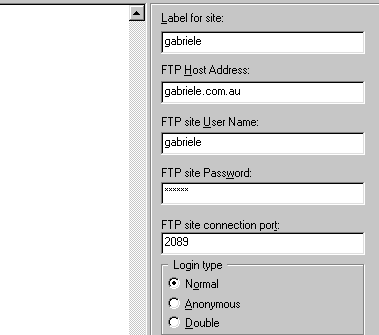
This is a typical setup for Cuteftp.
Label: Anything you like, but make it meaningful.
FTP Host address format can vary from server to server, but it is usually either ftp:hostname.extension or just hostname.extension (where hostname is your domain name).
FTP site User Name. This is the login assigned to you by your server provider. Sometimes it is the same as your email address login, sometimes it will be your domain name without extension…
Port Number: Note that the port number default is 21, and many servers will accept that.
CHMOD
chmod using FTP
Highlight the directory or file you need to change permissions on, and right click to bring up options. Select Properties/ CHMOD. Type in the permission value (755, 777 etc) and click save.
In cpanel, you can chmod using the file manager. Sometimes the server will not allow you to chmod via ftp so it may be necessary to use this method.
CHMOD 0444
If you cannot modify a file, for instance configure.php in oscommerce, use the file manager (disabled on some servers), or use this routine:
1. create a file called chmod.php, with this code inside it:
<?
$filename = “configure.php”;
chmod(“/home/username/public_html/catalog/includes/$filename”, 0444);
echo “chmod for $filename was changed”;
chmod(“/home/username/public_html/catalog/admin/includes/$filename”, 0444);
echo “<br>chmod for admin $filename was changed”;
?>
2. upload the file to your root directory
3. run the file from your browser with www.yoursite.com/chmod.php
4. delete chmod.php from server.
CHMOD using shell access, and more on FTP
http://fluxbb.org/docs/chmod